
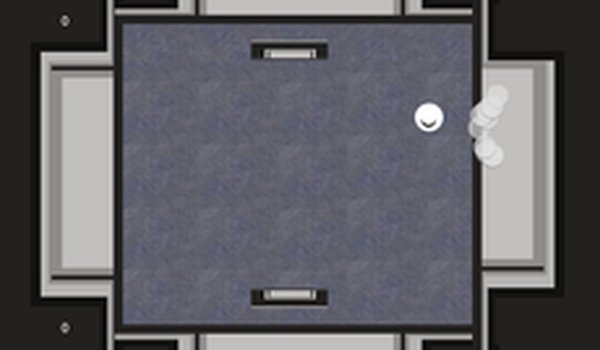
Two-Player Duel Setup
Zip Zop Arcade Match places two players on opposite sides of the same screen. One uses the A and D keys to move left and right; the other uses the Left and Right arrow keys. The shared screen keeps both competitors in view, so each can read the opponent's position and react. This local setup means no online connection is required, and the game runs on a single device.
Scoring with Balls and Obstacles
The core loop is simple: summon a ball to hit targets or disrupt your opponent. Balls can be used offensively to interfere with the other player's side or to score points directly. Obstacles add a second layer—placing them can block an opponent's movement or redirect the flow of play. Deciding when to summon a ball versus when to drop an obstacle is the main strategic choice in each match.
Speed Settings and Reset
A speed control lets players adjust the pace from slow to fast. Slower speeds give more time to plan ball and obstacle placement; faster speeds demand quicker reactions and tighter timing. The game can be reset at any moment, so rematches start without navigating menus. This makes it easy to play several short rounds in one sitting.
Controls and Accessibility
All input is keyboard-based, which keeps the control scheme immediate and responsive. The rules are easy to grasp—move, summon, block, score—so new players can join without a tutorial. Vibrant visuals and a straightforward premise suit friends or family looking for lighthearted competition. The five-minute tag suggests matches are designed to stay brief, fitting quick breaks or casual sessions.




Comments
0 comments