
Game Introduction
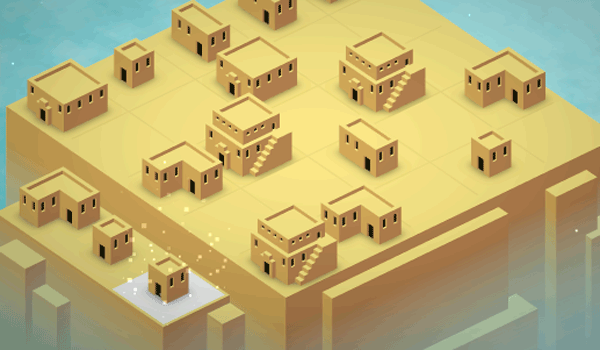
City Blocks Merge Puzzle is a relaxing strategy game where players build a city by merging identical buildings. Starting from small structures on a limited plot, the core objective is to combine two matching buildings to create larger, more advanced ones. The goal is to grow a town from humble cottages to towering skyscrapers through careful planning and space management. This endless puzzle offers a calm yet engaging experience with no timers or stressful elements, making it suitable for players of all ages who enjoy creative problem-solving. The game emphasizes thoughtful decision-making rather than speed, allowing players to take their time with each move. As the city expands, new building types become available, adding variety and a sense of progression. The simple yet strategic gameplay ensures that each session feels fresh and rewarding.
How to Play
Players begin by selecting a building from a panel and placing it onto their land. The key action is to position two identical buildings next to each other, which triggers a merge into a single, upgraded structure. This frees up space and unlocks new building types. The game continues as long as there is room to place new buildings. If the land becomes completely filled, the game ends. Success requires thinking ahead to create long merge chains and maximize every available tile. The controls are intuitive, with clear visual feedback for each action. Players typically plan their layout before placing buildings to keep space open for future merges. Grouping similar buildings together helps create efficient merge chains and prevents the board from filling up too quickly.
Game Features
Features include colorful and clear graphics that make buildings easy to identify. The game offers a relaxing pace with no time pressure, allowing players to plan their moves carefully. Each merge unlocks new building types, adding variety and a sense of progression. The strategic element of space management keeps gameplay fresh and challenging. It is suitable for both quick sessions and longer play, and the design is accessible for all ages. The endless nature means there is always a new challenge as players strive to achieve a higher score. The game may include visual feedback for merges, making it easy to see progress. The overall experience is calm and focused on creative problem-solving rather than competition.
Tips for Success
To succeed in City Blocks Merge Puzzle, plan your layout before placing buildings. Keep space open for future merges by grouping similar buildings together. Focus on creating long chains of merges to maximize points and unlock advanced structures quickly. Avoid filling the board randomly; think several moves ahead. If you get stuck, try merging smaller buildings first to free up area. Regular practice will help you recognize patterns and improve your strategic planning. Enjoy the process and take your time, as there is no rush.




Comments
0 comments