
Running a Station-Side Pizzeria
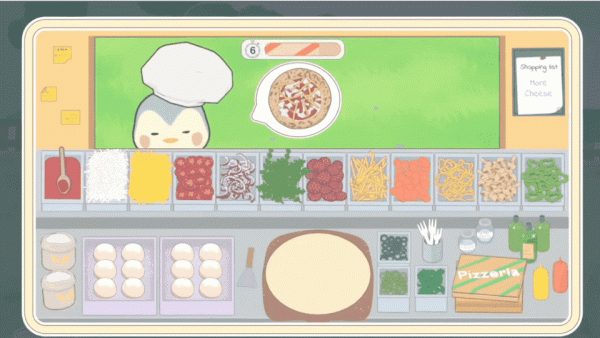
Flock Friends Pizza Shop puts you in charge of a pizza restaurant positioned beside a busy train station. Hungry animal travelers step off the train expecting fresh food, and your job is to assemble and bake pizzas before their patience runs out. The setup creates a steady rhythm: customers arrive, you build their orders, and you collect coins based on how quickly and accurately you serve them.
From Dough to Delivery
Each order starts with selecting fresh ingredients from your kitchen. You drag and drop toppings like cheese, vegetables, and meats onto the pizza base, then place it in the oven to bake. Once it is ready, you serve the waiting customer. The controls are simple touch or click inputs, so the challenge comes from speed and organization rather than complex commands. As you progress, orders grow more elaborate and trains arrive faster, pushing you to improve your workflow.
Upgrades, Recipes, and Progression
Coins earned from tips and completed orders can be spent on upgrading your oven, counters, and other shop equipment. Faster equipment lets you serve more customers, which in turn funds new recipes and ingredients. The game also includes daily challenges and progress tracking, giving regular players clear goals to work toward. The train station setting changes as you advance, keeping the visual backdrop from feeling static.
Who This Game Suits
The combination of time management, recipe assembly, and light business strategy makes Flock Friends Pizza Shop a good fit for players who enjoy cooking games with a planning element. The applied math and number tags suggest that ingredient quantities and order accuracy matter, while the strategy tag points to the upgrade decisions you make between shifts. Charming animal customers and a warm atmosphere keep the experience relaxing even when the pace picks up.





Comments
0 comments