Coffee Shop Management Simulator

Coffee Shop Management Simulator

Developer: Hologram Shift Studio
Published: 2024-03-01
Updated: 2026-07-04
| Applied Math , Business , Number , Simulation , Strategy

Review

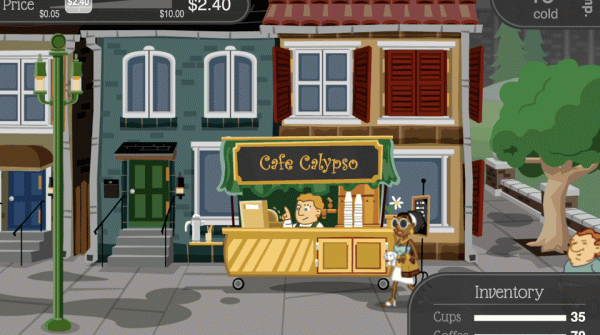
Coffee Shop Management Simulator offers a safe, engaging way to learn business fundamentals. The gameplay is straightforward: manage a budget, set prices, and serve customers. Its colorful design and easy controls make it accessible for all ages. The game excels at teaching financial planning without being overwhelming. A great choice for anyone interested in strategy or simulation games.

About This Game

Game Introduction

Welcome to Coffee Shop Management Simulator, a business simulation game where you take on the role of a coffee shop owner. Your goal is to build a successful cafe by managing resources, setting prices, and serving customers. The game combines elements of applied math, business strategy, and number management in a safe, educational environment. It is designed for players who enjoy planning and strategic thinking, and it offers a relaxing yet engaging experience that teaches the basics of running a small business. Each playthrough is different, offering a fresh challenge each time.

How to Play

To play, you start with a limited budget. You must purchase ingredients such as coffee beans, milk, and sugar. Then, you create a menu and set prices for your drinks. When customers arrive, you take their orders and prepare drinks quickly. Your pricing decisions affect both customer satisfaction and profit. You monitor daily earnings and expenses, and you can use profits to buy new recipes and shop upgrades. The game emphasizes careful planning and resource allocation.

Game Features

Features include budget planning and pricing strategy mechanics. You can unlock new recipes and shop upgrades as you progress. The game teaches financial planning in a simple, accessible way. It has a clean and colorful design with easy-to-learn controls, making it suitable for players of all ages. The simulation focuses on balancing customer happiness with financial stability, and it provides a safe, educational experience.

Tips for Success

To succeed, start by carefully managing your initial budget. Invest in essential ingredients first. Set your prices thoughtfully—high prices may reduce customer satisfaction, while low prices can cut into profits. Monitor your daily earnings and expenses regularly. Use profits to gradually upgrade your shop and expand your menu. Balancing customer happiness with financial growth is key. Practice planning ahead and adapting your strategy based on your results.

Compatibility

✅ Works on PC & Mobile | Recommended: Chrome / Safari / Edge

Faq

Is Coffee Shop Management Simulator free to play?
The game is typically free to play online, though some versions may offer optional in-game purchases for cosmetic upgrades or additional recipes. The core experience is available without payment.
Can I play Coffee Shop Management Simulator on mobile devices?
The game is designed to be played on desktop browsers, but some versions may be optimized for tablets. Mobile support varies by platform, so check the game's website for specific device compatibility.
Does Coffee Shop Management Simulator have a time limit or timer?
The game does not impose a strict time limit. You can play at your own pace, making decisions carefully without pressure. Some events may have a countdown, but the overall experience is relaxed.
What age group is Coffee Shop Management Simulator suitable for?
The game is suitable for all ages, including children and adults. It teaches basic business and math concepts in a safe, non-violent environment. Younger players may need help with reading instructions.
Are there different difficulty levels in Coffee Shop Management Simulator?
The game may offer adjustable difficulty settings, such as starting budget or customer demand. However, the default experience is designed to be accessible to beginners while still challenging for experienced players.
Can I save my progress in Coffee Shop Management Simulator?
Most online versions automatically save your progress to your browser's local storage. This means you can close the game and return later to continue from where you left off, as long as you use the same device and browser.

Comments

0 comments
U
User
Loading comments...