
Starting With the Basics
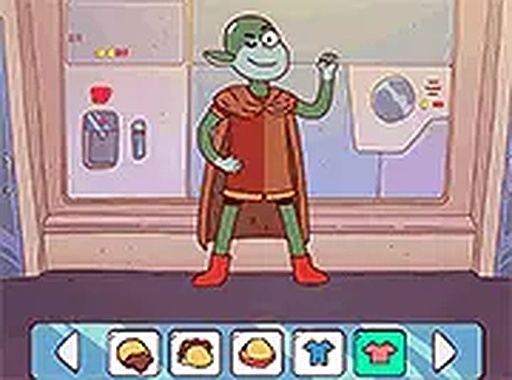
Personal Avatar Creator Workshop begins with foundational choices: skin tone and body type. These early decisions establish the base that later customization builds on. The game presents a range of options in each category, so children can think about how different features combine rather than rushing through a single preset. The interface is designed to be straightforward enough for young players to navigate without frustration, which keeps attention on the creative decisions instead of the controls.
Hair and Facial Features
After the body is set, players move to hairstyle and facial structure. Choices include various hair lengths, colors, and styles, along with different eye shapes, nose types, and mouth expressions. This stage is where a character starts to feel like a specific personality. A curly updo paired with a wide smile reads differently from straight hair and a serious expression. The game does not label any combination as right or wrong, so children are free to experiment without penalty.
Wardrobe and Accessories
The wardrobe section offers a broad collection of clothing and extras. Players select tops, bottoms, footwear, and accessories such as hats, glasses, or jewelry. Every item can be mixed and matched freely, and any selection can be changed at any time. That flexibility supports trial-and-error learning: children see how pieces work together and practice color coordination and personal style without pressure to finish quickly.
Saving, Sharing, and Access
Once a design is complete, the game offers options to save the creation for later viewing or to share it with friends and family. The sharing process is kept simple and safe, focusing on the creative output rather than complex social interactions. Personal Avatar Creator Workshop runs directly in a web browser on mobile phones and desktop computers, with no software download or account creation required. A full screen mode removes distractions, and controls are optimized for both touch screens and mouse input.



Comments
0 comments