
Core Gameplay Loop
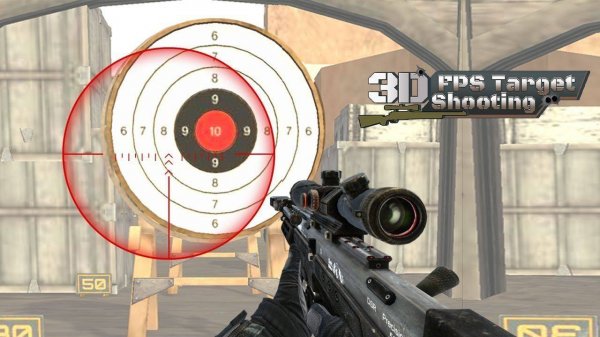
At its heart, Precision Point Gallery is about focus and timing. Players see a series of colorful markers appear in a three-dimensional space. The objective is to select each marker with a simple click or tap. Success depends on how quickly and accurately a player can react. There are no intricate storylines or complicated controls to learn. The game strips away distractions to create a pure test of hand-eye coordination. Each round presents a fresh set of markers, encouraging players to concentrate on the present moment. This straightforward design makes it easy for anyone to start playing immediately, regardless of their experience with video games.
Visual Style and Atmosphere
The game uses bright, cheerful colors against a clean 3D backdrop. Markers appear in various shapes and sizes, adding visual variety without overwhelming the player. The environment is designed to be pleasant and non-threatening, making it suitable for younger players and those who prefer a relaxed gaming experience. The smooth performance ensures that the action remains fluid, which is important for maintaining the sense of immersion. The overall aesthetic is modern and clean, avoiding dark or intense themes. This visual approach supports the game's goal of providing a stress-free activity that players can enjoy during a short break or a longer period of leisure.
Progression and Customization
As players successfully hit markers, they accumulate points. These points can be used in an in-game shop to unlock different tools. Each tool offers a unique characteristic, such as a wider field of view or a temporary boost. This system allows players to tailor their experience to their preferred style. For example, someone who values speed might choose a tool that helps them see more of the playing field at once. The game also introduces increasing difficulty over time. Markers may begin to move or appear in more challenging positions. This gradual ramp-up keeps the experience engaging without becoming frustrating. The game saves progress automatically, so players can return to their current challenge at any time.
Accessibility and Platform
Precision Point Gallery is built for broad accessibility. It runs directly in a web browser, requiring no downloads or installations. The controls are designed for one-handed use, working equally well with a mouse on a computer or a touchscreen on a tablet or phone. This cross-device compatibility means players can enjoy the game on their preferred hardware. The interface is intuitive, with clear visual cues guiding the player. There are no complicated menus or settings to adjust before starting. This focus on ease of use ensures that the game is approachable for a wide audience, from young children to older adults, and from casual players to those seeking a focused training tool for their reflexes.









Comments
0 comments